


Folder Organizer
2016
Folder Organizer

4.99$
7.99$

 Auf die Wunschliste
 Zu "Meine Käufe" hinzufügen
Mehr
Auf die BlocklisteiTunes Link kopieren
Folder Organizer
2016Für Folder Organizer liegt der aktuelle Preis bei Apple Books bei 4.99$. Der niedrigste Preis aller Zeiten betrug 2.99$, verfügbar am 29.01.2026. Du zahlst 2.00$ mehr als beim besten Angebot.
Preisinformation
2.99$
Tiefst
+2.00$
4.99$
Aktuell
-3.50$
8.49$
Höchst
Alle Zeiträume
Alle Zeiträume 
Preisverlauf von Folder Organizer auf Apple Books

18.09.20
6.99$
28.11.21
3.99$
09.03.22
8.49$
24.11.22
3.99$
16.12.22
5.49$
18.12.22
3.99$
29.01.26
2.99$
08.08.26
7.99$
22.11.26
4.99$

Initialer Preis - Der Preis mit dem der Titel in den Store gekommen ist.
Preisreduktion - Der Preis des Titels ist im Vergleich zum vorherigen Preis gefallen.
Preissteigerung - Der Preis des Titels ist im Vergleich zum vorherigen Preis gestiegen.
Tiefstpreis - Der bis dato günstigste Preis, den der Titel je hatte. Kommt der Preis später wieder auf diesen Wert zurück, wird allerdings nur eine Preisreduktion (grün) angezeigt.
Beschreibung
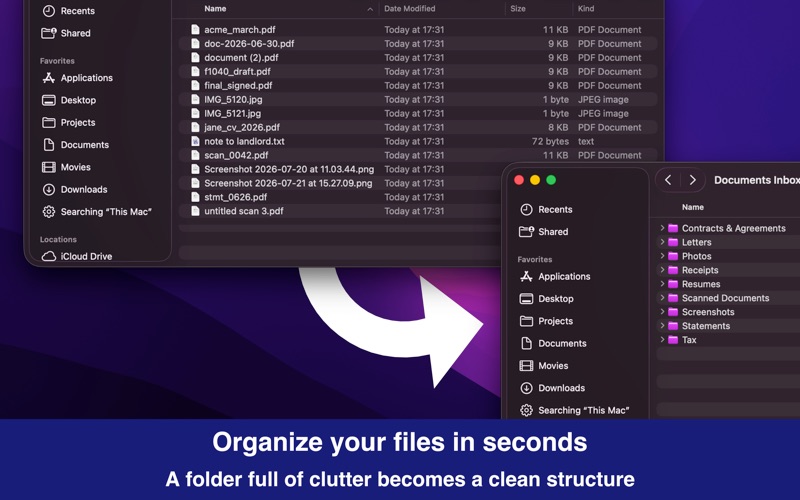
Folder Organizer turns a messy folder into a tidy one.
Point it at your Downloads, your Desktop, or a folder full of scans. Pick how
you want things grouped. You then get a full list of what will hap...pen — every
file and exactly where it's going — before anything moves.
NOTHING MOVES WITHOUT YOUR SAY-SO
Every run starts as a plan. See each file and its destination, uncheck the ones
you'd rather leave alone, remove files from the list, or send one somewhere
else. Nothing touches your disk until you press the button.
UNDO, EVEN LATER
Every run is recorded. Undo the one you just did, or open the history and
reverse a run from last week. Undo still works after you quit and reopen.
SORT THE WAY YOU WANT
• By kind — images, video, audio, PDFs, documents, archives, installers
• By date — year, quarter, month, week or day, in several formats
• By file extension, Finder tag, first letter, or size
• Or combine them: by kind, then by year, for nested folders
SORT BY WHAT'S INSIDE THE FILE
Choose Smart and the app reads your files — the text in a PDF, the words in a
scan — and files them by what they are: invoices, receipts, contracts, bank
statements, tax forms, screenshots, photos and more. If it gets one wrong,
correct it in the list before you apply. Your files are read on your Mac and
never leave it.
RENAME AS YOU GO
Build new names from the original name, a date, a counter, the parent folder or
the file type. You see an example as you type.
LET IT RUN BY ITSELF
Set a folder to watch — Downloads is the usual one — and new files get sorted
as they arrive. Prefer to stay in control? Turn on Ask First and a small alert
appears in the corner showing what's about to move, with a button to approve
it. Automatic runs are undoable too.
SAY IT IN YOUR OWN WORDS
Type something like "sort invoices and receipts into their own folders" and the
app sets it up for you to check before running.
BUILT LIKE A MAC APP SHOULD BE
• Drag files or folders straight onto the window
• Press Space for Quick Look, just like in Finder
• Save the setups you use often and reuse them
• Lives in the menu bar so watch folders keep working
• Shortcuts actions for your own automations
PRIVATE BY DEFAULT
Folder Organizer has no network access at all. Your files, what's in them, and
what you do with them stay on your Mac.
Screenshots




Information
| Genre | Utilities |
| Anbieter | Georgios Trigonakis |
| App Version | 2.0 |
| Min iOS Version | 14.0 |
| Dateigröße | 5.7 MB |
| Plattform | Mac |
Rezensionen
 Schreibe jetzt eine Rezension über diesen Titel und helfe damit anderen Nutzern!
Angebot teilen
In die Zwischenablage kopieren


