


Visual Multi-Band Compressor
2019

Visual Multi-Band Compressor

9,99 €
5,99 €

 Liste de souhaits
 Ajouter à "Mes Achats"
Plus
Ajouter à la liste d'exclusionCopier le lien iTunes
Visual Multi-Band Compressor
2019Für Visual Multi-Band Compressor liegt der aktuelle Preis bei App Store bei 9,99 €. Der niedrigste Preis aller Zeiten betrug 5,49 €. Du zahlst jetzt 4,50 € mehr als beim besten Angebot.
Information de prix
5,49 €
Plus bas
+4,50 €
9,99 €
Actuel
9,99 €
Plus haut
Alle Zeiträume
Alle Zeiträume 
Tendance des prix de Visual Multi-Band Compressor sur App Store

09/08/19
8,99 €
05/10/19
6,99 €
07/10/19
8,99 €
23/12/19
6,99 €
28/12/19
8,99 €
18/06/20
6,99 €
19/06/20
8,99 €
27/06/20
6,99 €
28/06/20
8,99 €
22/08/20
6,99 €
24/08/20
8,99 €
25/12/20
6,99 €
28/12/20
8,99 €
15/04/21
5,49 €
16/04/21
8,99 €
15/09/21
7,99 €
20/11/21
5,99 €
22/11/21
7,99 €
28/11/21
5,99 €
29/11/21
7,99 €
11/10/22
9,99 €
22/11/22
6,99 €
24/11/22
9,99 €
04/03/23
5,99 €
06/03/23
9,99 €

Prix initial - Le prix auquel le titre est entré dans le magasin.
Baisse de prix - Le prix par rapport à celui d'avant a baissé.
Augmentation de prix - Le prix par rapport à celui d'avant a augmenté.
Meilleur prix - Le prix le plus bas que le titre ait jamais eu à ce jour. Si le prix revient à cette valeur plus tard, seule une baisse de prix (verte) est affichée.
Synopsis
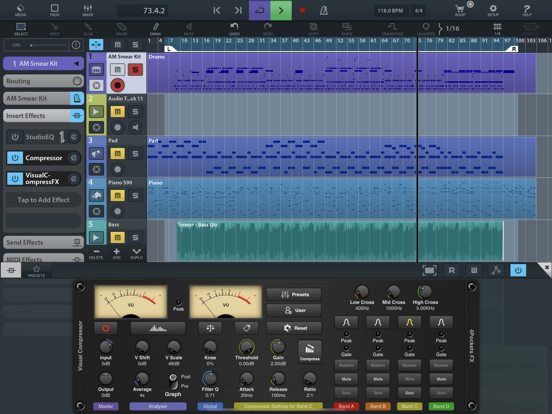
This is an AUv3 compatible visual effect plugin which is intended for use inside your favourite DAW such as Cubasis, Auria, Meteor, AUM etc. It will not function as a standalone app.
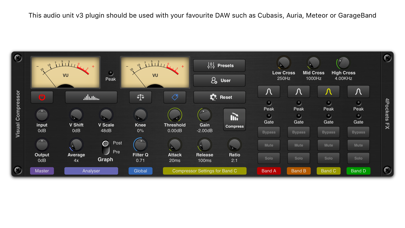
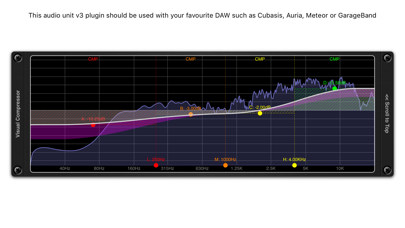
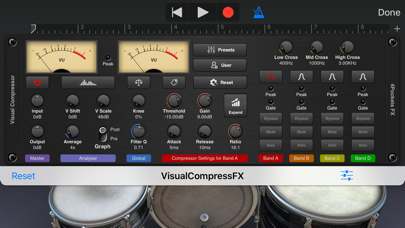
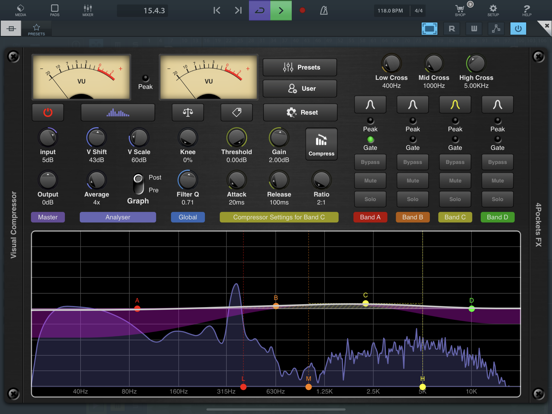
Visual Compresso...r is a 4 band compressor/expander which has the ability to analyse audio in real time giving an accurate and reliable spectrum representation of your signal as well as visual feedback of compression or expansion levels. It's uses range from final mastering of songs to dynamic manipulation and EQing of drum tracks.
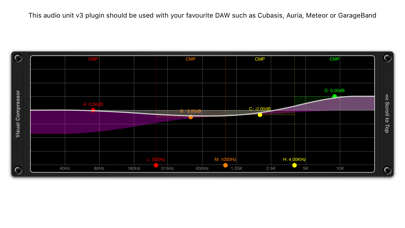
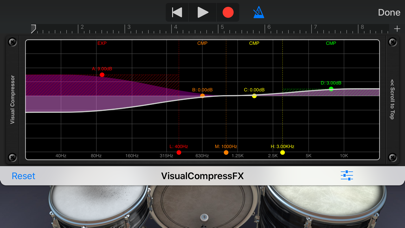
What makes this different from a normal compressor is the ability to compress or expand frequency ranges rather than the whole mix, with up to 4 bands available. This allows you to say tighten up a wayward snare drum while adding that extra punch to the bass drum while leaving the rest of the track intact.
Each of the 4 configurable frequency bands can be modified using drag and drop operations directly on the graph making it easy to understand and quick to configure. Turn on the labelling option for colour coded details. Each band can function as an EQ allowing raising and lowering the bands gain by +/-24dB. You can assign either a compressor or expander to each of the bands.
The compressor allows you to compress excessively loud sounds that exceed a specified threshold. Each band has configurable attack, release and ratio settings.
The expander can be used to expand sound exceeding the threshold while compressing anything below it. This makes it useful for adding dynamics or even for noise reduction of a specific band.
Each band has mute and solo buttons so you can audition what is coming through a certain band, great for use during band frequency setup. There is also a bypass option which removes a band from use and reduces CPU load.
You can load and save custom presets as well as copy and paste settngs between instances. This is great if you need to setup multiple instances with the same settings.
One of the cool features is the ability to save up to 3 mixes and switch between them for comparision. These mixes are actually saved as part of custom presets and as the saved state in your DAW.
This is the third of three products which will make up part of the 'visual' range of effects.
Main Features:
○ 4 distinct frequency bands.
○ Assignable Compressor or Expander.
○ +/-24dB gain per band.
○ Assignable Q to control precise crossovers.
○ Spectrum Analyser with 'Pre' and 'Post' monitoring.
○ Vertical shift and scale options for the spectrum.
○ Mute and Solo buttons for each band.
○ Save & Compare up to 3 separate mixes.
○ Bypass option to remove a band and reduce CPU load.
○ Create and save custom presets.
○ Copy / Paste presets between instances.
○ Compressor / Limiter with Auto Makup Gain.
○ Twin VU meters with RMS/Peak display as well as peak and gate lights per band.
○ Brick wall limiter.
○ Quick Reset options for each section of the effect.
Captures d'écrans




Information
| Genre | Music |
| Auteur | Limelight Software |
| Version | 1.02 |
| Version iOS minimum | 14 |
| Taille | 6.7 MB |
| Plateforme | iPhone/iPad |
Avis des utilisateurs
 Aide les autres et donne ton avis maintenant!
Partager
Copier dans le presse-papier