


Mirage Capture
2026
Mirage Capture

11,99 €
14,99 €

 Auf die Wunschliste
 Zu "Meine Käufe" hinzufügen
Mehr
Auf die BlocklisteiTunes Link kopieren
Mirage Capture
2026Für Mirage Capture liegt der aktuelle Preis bei App Store bei 11,99 €. Der niedrigste Preis aller Zeiten betrug 5,99 €, verfügbar am 25.09.2026. Du zahlst 6,00 € mehr als beim besten Angebot.
Preisinformation
5,99 €
Tiefst
+6,00 €
11,99 €
Aktuell
-6,00 €
17,99 €
Höchst
Alle Zeiträume
Alle Zeiträume 
Preisverlauf von Mirage Capture auf App Store

25.09.26
5,99 €
27.09.26
8,99 €
14.10.26
9,99 €
17.10.26
17,99 €
18.10.26
9,99 €
18.11.26
14,99 €
22.11.26
11,99 €

Initialer Preis - Der Preis mit dem der Titel in den Store gekommen ist.
Preisreduktion - Der Preis des Titels ist im Vergleich zum vorherigen Preis gefallen.
Preissteigerung - Der Preis des Titels ist im Vergleich zum vorherigen Preis gestiegen.
Tiefstpreis - Der bis dato günstigste Preis, den der Titel je hatte. Kommt der Preis später wieder auf diesen Wert zurück, wird allerdings nur eine Preisreduktion (grün) angezeigt.
Beschreibung
Mirage turns the devices you already own into a video crew. Your iPhone is the camera, your iPad is the monitor, either can be the studio, and Apple Watch is the remote. No account, and on your own ne...twork no cloud. Remote, an optional subscription for the studio, brings in cameras from anywhere, end-to-end encrypted.
WHAT WORKS WHERE
• iPhone and iPad: Camera, Studio, Screen Share, and Microphone, a wireless mic that records its own copy.
• iPad only: Capture Card. iPhone can bring an iPad's Capture Card broadcast into its studio.
• Apple Watch: a remote for Mirage on your iPhone, with a live preview.
• Mac: Mirage for Mac, a studio for every camera you own.
A CAMERA FOR OBS (iPhone and iPad)
• Video and microphone audio go into OBS and other NDI-compatible software over your network.
• Send it to a Mirage studio, record it on the device, or stream it to a service with your own stream key (RTMP).
• Several of an iPhone's cameras at once, each its own source, on models that support it.
• Cinematic blur and rack focus on supported models, and a green screen over a colour, a photo, or a looping video.
• Auto Framing, hand gestures, game controllers, a teleprompter that follows your voice, and full control of lenses, focus, exposure, and white balance.
• Record in H.264, HEVC, ProRes, or Apple Log on supported iPhone Pro models.
STUDIO (iPhone and iPad)
Put your cameras together with no Mac: every Mirage broadcast nearby, the device's own camera and, on iPad, its capture card; up to four sources on iPad, three on iPhone. Group them, switch by hand or follow whoever talks or the camera you look at, record, and stream. Show the result clean on a connected display or with AirPlay. Or switch to a Mac's studio, nearby or far away, and run it from your hand.
REMOTE (optional subscription)
The studio, on a Mac, iPhone, or iPad, turns on Remote and shares a link. A guest anywhere opens it and sends Camera, Screen Share, Microphone, or an iPad's Capture Card, as if they were in the room. An iPhone or iPad can also run a Mac's studio from far away. Only the studio subscribes; guests join free. Relayed connections are subject to fair use.
LIGHTS AND AUTOMATIONS
Matter-compatible lights show what Mirage is doing: red while you record, purple while the Mac's virtual camera is in use. Automations are your own rules: when you say a phrase, look at a camera, or press a controller button, Mirage can record, add a marker, switch cameras, show a title, or light your lamps.
CAPTURE CARD (iPad only)
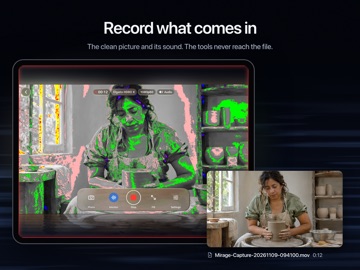
Connect a compatible UVC capture card to an iPad with a USB-C port to monitor a camera, console, or computer, with false color, zebras, focus peaking, a waveform, and your own LUTs. Record, stream, or broadcast the clean feed.
MIRAGE FOR MAC
Bring in your iPhones and iPads, use the result as your camera in Zoom, FaceTime, and OBS, record every angle in sync, and add live captions and instant replay.
PRIVATE BY DESIGN
No account. Mirage devices pair with a six-digit code. With Remote, video goes directly between devices, or through a relay that can't read it. NDI output doesn't use the code, so use a network you trust.
REQUIREMENTS
• Devices on the same local network, or anywhere with Remote.
• Capture Card needs an iPad with a USB-C port and a compatible UVC capture card. OBS needs an NDI receiver plugin.
• Cinematic needs iOS 26 or iPadOS 26 on a supported model. Lights need Matter-compatible lights.
• Mirage for Mac needs macOS 26 or later. Update Mirage on every device.
Remote is an optional auto-renewable subscription charged to your Apple Account. It renews unless cancelled at least 24 hours before the period ends; manage it in your App Store account settings.
Terms of Use: https://www.apple.com/legal/internet-services/itunes/dev/stdeula/
Privacy Policy: https://www.getmirage.dev/privacy
NDI is a registered trademark of Vizrt NDI AB.
Screenshots




Information
| Genre | Photo & Video |
| Anbieter | Sachin Belose |
| App Version | 4.0 |
| Min iOS Version | 17.0 |
| Dateigröße | 36.8 MB |
| Plattform | iPhone/iPad |
Rezensionen
 Schreibe jetzt eine Rezension über diesen Titel und helfe damit anderen Nutzern!
Angebot teilen
In die Zwischenablage kopieren


