






PDF Expert by Readdle
2013


PDF Expert by Readdle

Free
89.00 kr.

 Add to Wishlist
 Add to "My Purchases"
More
Add to Block ListCopy iTunes Link to Clipboard
PDF Expert by Readdle
2013For PDF Expert by Readdle, the current price at App Store is . The lowest price ever was , available on 07.08.2019. You are paying more than the best deal.
Price Information
Lowest
Current
-89.00 kr.
89.00 kr.
Highest
All Time
All Time 
Price Trend of PDF Expert by Readdle on App Store

14.01.17
79.00 kr.
03.05.17
89.00 kr.
27.07.17
45.00 kr.
09.08.17
89.00 kr.
21.11.17
45.00 kr.
30.11.17
89.00 kr.
07.08.19
Free

Initial price - The price at which the title entered the store.
Price drop - The price compared to the one before has dropped.
Price raise - The price compared to the one before has raised.
Best price - The lowest price the title has ever had to date. If the price comes back to this value later, however, only a price drop (green) is displayed.
Summary
PDF Expert 6 is an essential app for anyone who reads, highlights, signs and fills out PDFs on their iPhone and iPad. With an additional in-app purchase PDF Expert 6 acquires the unique superpower to ...edit existing PDF text, replace images and hide sensitive data.
“PDF Expert is one of my must-have iPad apps and a desktop-class PDF reader”. – MacStories.net
“I was blown away at how easy the app is to use”. – MakeUseOf
“The best app for managing, editing, and reading PDFs on your iPad”. – The Sweet Setup
*** WITH PDF EXPERT 6 YOU CAN ***
HIGHLIGHT AND REVIEW PDFS
• Mark important information in books, journals or documents with the first class annotation tools: highlight, underline, strikethrough and others.
• Insert predesigned stamps such as Approved, Not Approved, Confidential and more.
• Create diagrams and schemes using shapes such as arrows, circles or rectangles.
FILL FORMS
• Work with static PDF forms created in Adobe Acrobat.
• Fill out any PDF forms with interactive fields such as text fields, checkboxes and radio buttons.
SIGN DOCUMENTS
• Use e-signatures to sign contracts and agreements on the go.
• Sign documents with signatures synchronized across all your devices: Mac, iPhone, iPad.
DRAW WITH YOUR FINGER OR APPLE PENCIL
• Draw with your finger or Apple Pencil to make handwritten notes or highlight text in scanned books.
EDIT OUTLINES
• Edit outlines in a few taps to structure your data and for better navigate through the file.
PROTECT CONTENT WITH PASSWORD AND ENCRYPTION
• Restrict access to PDF Expert with a password.
• Protect your files from unauthorized reading with a password.
• Enable iOS Data Protection to encrypt everything while your iPad or iPhone is not in use.
WORK IN THE CLOUD
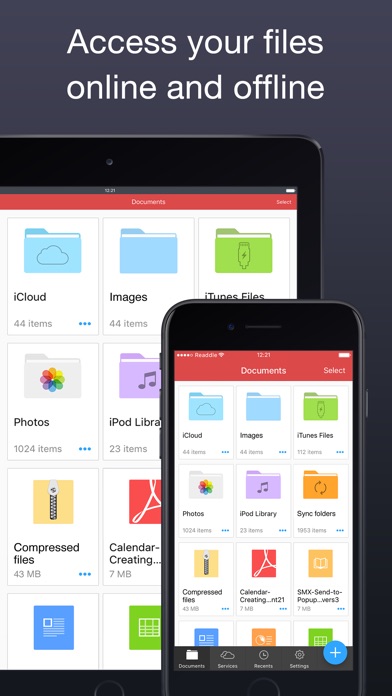
• Connect to other document storage providers like Dropbox, iCloud Drive, Box, OneDrive, Google Drive etc. Work with files right in the storage and all edits will be saved there without downloading the document.
• Enable 2-way sync with storages to provide the continuous work with documents among all devices.
CREATE NOTES
• Add comments to the texts you read using sticky notes and drawing tools.
MAKE BOOKMARKS
• Make Bookmarks when it comes to intuitive navigation through PDF files.
READ PDFs WITH EASE
• Quickly open PDF documents from email, the web, or any app that supports “Open In…”
• Enable full text search, scroll, zoom in and out.
• Choose Single Page or Continuous scroll mode.
• Use Text to Speech feature to hear the selected text read out loud.
*** WITH PRO FEATURES OF IN-APP PURCHASE YOU CAN***
With additional in-app purchase you can have the unique superpower that allows you to edit PDFs. New features come as an additional in-app purchase for pros.
EDIT PDF TEXT
• Edit or modify existing text. The font, size, and opacity of the original text are automatically detected, so you can make edits easily.
EDIT PDF IMAGES
• Easily add, replace and resize images in your PDFs. Or change a logo or a graph. PDF Expert will handle those edits easily.
ADD LINKS
• Now linking any part of the text to a different page or even a website is fast. Moreover, links can be added to the images.
REDACT SENSITIVE DATA
• Using the Redact feature you can permanently erase or hide any sensitive information in your PDFs.
PDF Expert is also available in the Mac App Store. It has been voted “App of the Year Runner-up” by Apple.
Screenshots




Information
| Genre | Productivity |
| Vendor | Readdle Technologies Limited |
| App Version | 7.26.4 |
| Min iOS Version | 16.0 |
| File Size | 343.6 MB |
| Platform | iPhone/iPad |
User Reviews
 Help others and write a review now!
Share this offer
Copy to clipboard


