






Text Workflow: Text Converter
2022
Text Workflow: Text Converter

17,99 €
14,99 €

 Liste de souhaits
 Ajouter à "Mes Achats"
Plus
Ajouter à la liste d'exclusionCopier le lien iTunes
Text Workflow: Text Converter
2022Pour Text Workflow: Text Converter, le prix actuel chez App Store est de 17,99 €. Le prix le plus bas jamais enregistré était de 2,99 €. Vous payez maintenant 15,00 € de plus que la meilleure offre.
Information de prix
2,99 €
Plus bas
+15,00 €
17,99 €
Actuel
17,99 €
Plus haut
Depuis le début
Depuis le début 
Tendance des prix de Text Workflow: Text Converter sur App Store

08/10/23
5,99 €
23/11/23
2,99 €
10/01/24
5,99 €
09/04/24
6,99 €
04/06/24
9,99 €
31/08/24
7,99 €
24/11/24
9,99 €
11/12/24
14,99 €
03/08/25
17,99 €

Prix initial - Le prix auquel le titre est entré dans le magasin.
Baisse de prix - Le prix par rapport à celui d'avant a baissé.
Augmentation de prix - Le prix par rapport à celui d'avant a augmenté.
Meilleur prix - Le prix le plus bas que le titre ait jamais eu à ce jour. Si le prix revient à cette valeur plus tard, seule une baisse de prix (verte) est affichée.
Synopsis
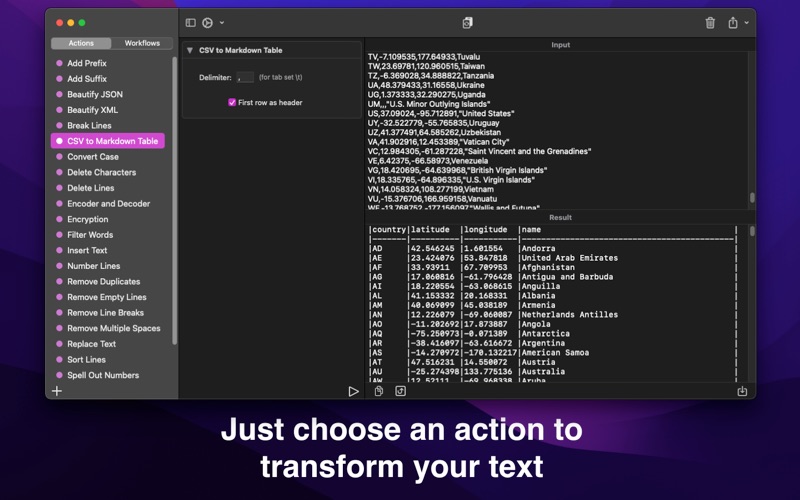
A powerful and easy-to-use tool that will help you transform your text. Text Workflow removes the need to perform repetitive tasks manually on your text.
Combine transformation actions to create powe...rful automations for your text. Save your transformation workflows to use them any time you want.
With more than 30 text transformation actions.
Text Workflow is an easy-to-use yet extremely powerful app for taking any text and transforming it into the format you need, when you need it.
Whether you’re a journalist tired of making repetitive changes to text so that you can use it in your copy or a programmer who needs to convert YAML to JSON with ease, Text Workflow is the app you’ve been looking for.
Take any text that doesn’t look the way you need it to and Text Workflow will make the changes so that you don’t have to. It’ll do it quickly and securely, too — all conversions are done on-device so your text is never transmitted over the internet.
Text Workflow’s iPhone and Mac apps are the perfect tools for converting text at your desk and on the move — and iCloud sync means that all of your workflows go with you as well.
With an extensive (and growing) list of text transformation actions Text Workflow can do it all. Some examples of the actions available include:
•Add and remove text
•Replace unwanted text
•Sort text based on your parameters
•Convert text case to match your needs
•Remove line breaks, unwanted spaces, and duplicate words.
•Count words, characters, and lines
And that’s just the start. Text Workflow can do more than manipulate simple text — you can also encode and decode URLs and Base64 and convert multiple data formats including JSON, CSV, and YAML. Text Workflow can manipulate text in too many ways to list here — see the full list at the support page.
Text Workflow is designed to be easy to use but also caters to those with more advanced needs. You can chain multiple actions together to create your own workflow and even share those workflows with others. Need to go a step further? Shortcuts support puts all of Text Workflow’s actions at your fingertips at all times.
Available text transformation actions:
• Add prefix
• Add suffix
• Replace text
• Sort lines
-alphabetically
-reverse
-shuffle
-by length
• Trim Lines
• Add line number
• Break lines
-after every word
-after every sentence
-after text
-before text
• Convert Case
-uppercase
-lowercase
-title case
-camel case
-pascal case
• Delete Characters
-selected characters
-non-alphanumeric
-numeric characters
-non numeric
-tabs
-spaces
-characters after position
-characters before position
-last characters
-emojis
-characters after text
-characters before text
• Insert Text
-at first line
-at last line
-every line (position)
-before every word
-after every word
-before text
-after text
-after every character
• Delete Lines
-containing text
-starting with text
-not containing text
-not starting with text
• Remove line breaks
• Remove multiple spaces
• Remove duplicates lines
• Remove duplicates words
• Remove empty lines
• Delete/Filter words
-containing text
-starting with text
-not containing text
-not starting with text
• Spell out lines
• Get Statistics
-count characters
-count words
-count lines
• Encode/Decode
-Base64
-URL
• Encrypt/Decrypt Text with password
• Beautify JSON
• Beautify XML
Captures d'écrans




Information
| Genre | Utilities |
| Auteur | Georgios Trigonakis |
| Version | 3.5 |
| Version iOS minimum | 13.0 |
| Taille | 11.7 MB |
| Plateforme | Mac |
Avis des utilisateurs
 Aide les autres et donne ton avis maintenant!
Partager
Copier dans le presse-papier


