


ScreenAlert
2026
ScreenAlert
5,99 €

 Liste de souhaits
 Ajouter à "Mes Achats"
Plus
Ajouter à la liste d'exclusionCopier le lien iTunes
ScreenAlert
2026Pour ScreenAlert, le prix actuel chez App Store est de 5,99 €. Il n'y a jamais eu de réductions de prix.
Information de prix
5,99 €
Plus bas
5,99 €
Actuel
5,99 €
Plus haut
Tendance des prix de ScreenAlert sur App Store

22/05/26
5,99 €

Prix initial - Le prix auquel le titre est entré dans le magasin.
Baisse de prix - Le prix par rapport à celui d'avant a baissé.
Augmentation de prix - Le prix par rapport à celui d'avant a augmenté.
Meilleur prix - Le prix le plus bas que le titre ait jamais eu à ce jour. Si le prix revient à cette valeur plus tard, seule une baisse de prix (verte) est affichée.
Synopsis
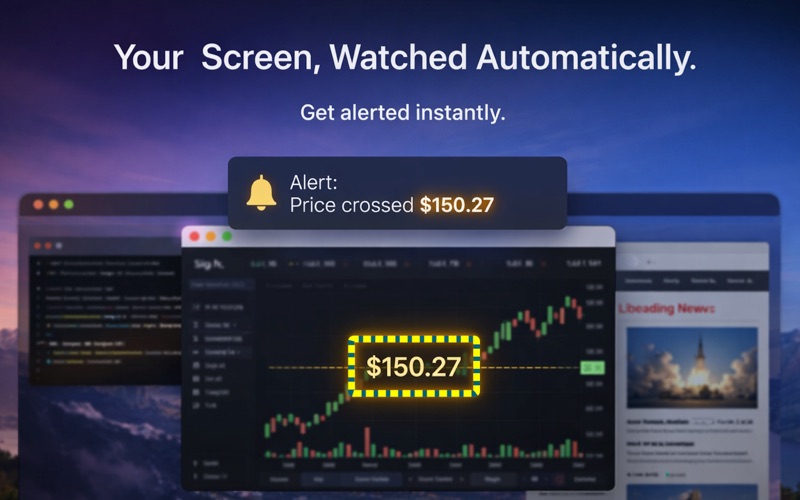
Turn any part of your screen into a smart alert system.
Select one area — or many — and ScreenAlert reads each one with advanced OCR and notifies you the moment it changes.
No integrations. No APIs.... Works with any app, any window, any content.
USE CASES
•Track stock prices or crypto values — get alerted when targets are hit
•Monitor builds, logs, or dashboards — react instantly to changes
•Follow live scores, auctions, or countdowns — never miss critical moments
•Watch apps that don't support notifications — make anything "alertable"
•Keep an eye on several things at once — each alert runs independently
KEY FEATURES
OCR Screen Reader
•Select any screen area and extract text instantly
•Read text aloud with natural macOS voices
•Copy recognized text to clipboard
•Works across multiple monitors
•Optional continuous auto-reading
Multiple Simultaneous Alerts
•Run as many alerts as you need at the same time
•Each alert has its own color, name, region, and trigger
•Menu bar shows a live count of active alerts
•One-click Stop on every alert — or stop them all at once
•Auto-named "Alert 1, 2, 3…" with smart slot reuse
Smart Alerts (7 Trigger Types)
•Text changed
•Text equals / does not equal
•Number equals / greater / less than
•Image change detection (adjustable sensitivity)
Actions when triggered:
•Speak text aloud
•Play alert sound
•Run any macOS Shortcut (powerful automation)
Floating Preview Panels (Picture-in-Picture)
•Optionally flash the captured area in a small floating panel each time an alert fires
•Multiple previews stack neatly at the corner of your choice
•Slide off to the screen edge when they auto-hide
•Hover an alert in the menu to peek at its last capture
•Configurable position, size, and auto-hide delay
On-Screen Controls
•A colored name pill floats above each watched region
•Built-in Stop (×) button — end an alert without ever opening the menu
•Distinct color per alert makes overlapping regions easy to tell apart
Window Tracking
•Lock monitoring to a specific app window
•Automatically follows movement or backgrounding
•Persistent visual tracking indicator
Text Processing Engine
•Clean and normalize captured text before evaluation
•Remove unwanted characters, spaces, emojis, non-ASCII
•Trim text using rules or keywords
•Live preview of processed output
Reading History & Export
•Automatic log of all captured readings
•Search and review past entries
•Export to CSV for analysis
•Stores up to 1,000 recent records
Fully Customizable
•Multiple languages and voice options
•Adjustable scan interval
•Control alert duration and behavior
•Optional screenshot sound toggle
•Launch at login
BUILT FOR macOS
•Native, lightweight menu bar app (no Dock clutter)
•Powered by Apple Vision for fast, accurate OCR
•Works seamlessly with macOS Shortcuts
•Privacy-first: no cloud, no tracking, no data leaves your Mac
•One-time purchase — no subscriptions
Captures d'écrans


Information
| Genre | Utilities |
| Auteur | Georgios Trigonakis |
| Version | 1.3 |
| Version iOS minimum | 13.5 |
| Taille | 2.9 MB |
| Plateforme | Mac |
Avis des utilisateurs
 Aide les autres et donne ton avis maintenant!
Partager
Copier dans le presse-papier


