


RAYS - 3D Path Tracer
2026
RAYS - 3D Path Tracer
9,99 €

 Add to Wishlist
 Add to "My Purchases"
More
Add to Block ListCopy iTunes Link to Clipboard
RAYS - 3D Path Tracer
2026For RAYS - 3D Path Tracer, the current price at App Store is 9,99 €. There hasn't been any price reductions so far.
Price Information
9,99 €
Lowest
9,99 €
Current
9,99 €
Highest
Price Trend of RAYS - 3D Path Tracer on App Store

25/11/26
9,99 €

Initial price - The price at which the title entered the store.
Price drop - The price compared to the one before has dropped.
Price raise - The price compared to the one before has raised.
Best price - The lowest price the title has ever had to date. If the price comes back to this value later, however, only a price drop (green) is displayed.
Summary
RAYS is a real path tracer for iPhone and iPad: the same kind of light simulation used by film and product-visualization renderers, running on your device's hardware ray tracing. Hit Render, and watch... a photoreal image come together in seconds.
IMPORT
• Open USDZ, USD, glTF, GLB and OBJ models, from Files, Mail, Messages or AirDrop ("Open in RAYS").
• Materials, textures, variants and lights come in with the model; your original file is never changed.
• Add several models to one scene; move, turn and scale them with an on-screen gizmo.
LIGHT
• Three studio HDRIs light your model with real image-based light. Turn them, set their exposure, or show them behind the model.
• Add sun, bulb, spot and area lights.
• Shadow catcher: an invisible floor that catches soft shadows and reflections.
• Ground projection lays the HDRI's floor under your model.
• Backdrop colors, with Bounce light: the set color lights your model back, like a colored studio cyc.
RENDER
• Progressive path tracing: soft shadows, reflections, glass and bounce light, refining with every sample.
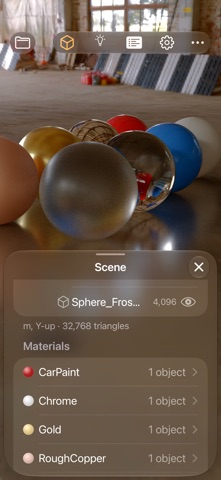
• Physically based materials: metal, glossy and rough surfaces, clear coat, clear and frosted glass.
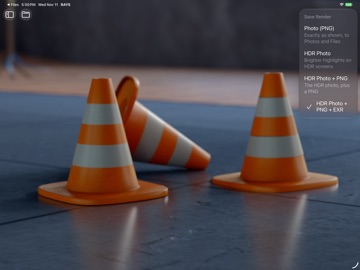
• A denoiser for clean images faster, and depth of field with real camera settings and Tap to Focus.
• Render at screen size or larger (2× and 3×), or at 720p, 1080p, 4K or 4:3.
• Save renders to Photos as PNG or HDR photos, plus EXR for compositing.
COMPOSITE
• Put your model into your own photo: pick a picture from Photos or Files, drag, pinch and twist it into place, and lock it.
• The shadow catcher sets your model on the photo's floor; the HDRI lights it to match.
• Depth of field blurs the picture along with the scene, and film grain (amount, size, color) ties render and photo together.
• Camera Roll tilts the camera to match a photo that wasn't shot level.
PREVIEW
• A fast real-time Preview for framing and arranging, with Preview Effects: ambient occlusion, curvature, depth of field, bloom, tone mapping (Neutral, AgX, ACES), color balance, vignette, grain and more.
SCENES
• Save your scene, with every move, light, camera and material edit, as one file that opens in Quick Look and other USD apps.
• Start on iPhone, AirDrop the scene to your iPad, and pick up right where you left off: the models, lights, cameras and HDRI all travel in the one file.
• Saved cameras, including a Default camera to get back to the opening view.
• Sample scenes to start from: Sketchbot, Material Spheres and two classic Cornell boxes.
Designed first for iPhone Duo, folded or open, and at home on iPhone and iPad.
REQUIREMENTS
Rendering is fastest with hardware ray tracing: iPhone 15 Pro, iPhone 16 or later; iPad Pro (M4 or later), iPad Air (M3 or later), iPad mini (A17 Pro or later). Older devices render more slowly.
Screenshots






Information
| Genre | Graphics & Design |
| Vendor | Sketchbot Studios, Inc. |
| App Version | 1.1 |
| Min iOS Version | 27.1 |
| File Size | 33.6 MB |
| Platform | iPhone/iPad |
User Reviews
 Help others and write a review now!
Share this offer
Copy to clipboard


