





nPlayer
2016


nPlayer

¥800.00
¥700.00

 Add to Wishlist
 Add to "My Purchases"
More
Add to Block ListCopy iTunes Link to Clipboard
nPlayer
2016For nPlayer, the current price at App Store is ¥800.00. The lowest price ever was ¥600.00. You are now paying ¥200.00 more than the best deal.
Price Information
¥600.00
Lowest
+¥200.00
¥800.00
Current
¥800.00
Highest
All Time
All Time 
Price Trend of nPlayer on App Store

18/06/02
¥600.00
19/10/02
¥610.00
22/10/10
¥800.00
23/05/25
¥700.00
24/12/04
¥800.00

Initial price - The price at which the title entered the store.
Price drop - The price compared to the one before has dropped.
Price raise - The price compared to the one before has raised.
Best price - The lowest price the title has ever had to date. If the price comes back to this value later, however, only a price drop (green) is displayed.
Summary
** nPlayerは公式にDTS(DTS HD)、DTS Headphone:Xに対応しています。
** nPlayerはDolby(AC-3、E-AC3)に対応しています。
** nPlayerはユニバーサルアプリケーションです。あなたは追加購入することなく、他のiOSデバイスにインストールすることができます。
** nPlayerはiOS 9.3以上のバージョンで支援されます。 もっと...多様なiOSバージョンで利用をお望みでしたら、nPlayer Plus(ライセンスされたDolbyコーデックとDolby音場効果を含む)を購入してください。
- 端末で動画を見るために、MP4に変換しておく必要はありません。nPlayerさえあれば、どんな種類の動画フォーマット・コーデックであっても変換することなく再生できます。
- 限られた容量しかない端末に動画を保存しておく必要はありません。nPlayerの強力で多種多様なネットワーク技術で、ネット上の動画をストリーミング再生できます。
- 指先だけで、再生位置を調整したり、前/次の字幕に移動したり、字幕位置やフォントサイズを調整したり、音量や明るさをコントロールしたりすることができます。
- 何千人ものユーザーから支持されているnPlayerをぜひ体験してみてください。
* 特徴
- DTSオーディオコーデック(DTS HD)に公式対応
- Dolbyオーディオコーデック(AC3、E-AC3)に対応
- iXpandフラッシュドライブのサポート
- Chromecastに対応
- スマートテレビ用ビデオキャスト
- HDMI出力に対応
- 以下の動画形式に対応:MP4、MOV、MKV、AVI、WMV、ASF、FLV、OGV、RMVB、TPなど
- 以下の音声形式に対応:MP3、WAV、WMA、FLAC、APEなど
- 以下の字幕形式に対応:SMI、SRT、SSA、IDX、SUB、LRC、SUP、MLP2など
- 以下の画像形式に対応:JPG、PNG、BMP、GIF、TIFFなど
- 以下のプレイリスト形式に対応:CUE、M3U、PLS
- WebDAV、FTP、SFTP、HTTP、SMB/CIFS、NFSに対応
- UPnP/DLNAに対応(DLNAサーバが字幕情報を提供している場合は字幕にも対応)
- クラウドサービスに対応(Amazon Cloud Drive、Box、Dropbox、Google Drive、OneDrive、Yandex.Disk)
- 東芝ワイヤレスストレージに対応(FlashAir、ワイヤレスSSD、ワイヤレスHDD、ワイヤレスアダプタ)
- アプリ内ウェブブラウザに対応
- iTunesの動画/音声の再生に対応(DRMコンテンツは除く)
- アルバム内の動画や画像の表示に対応
- 再生速度変更:0.5倍速〜4.0倍速
- 前回の再生位置を保存
- ABリピート(指定範囲のリピート)
- スクリーンロック
- HEVC/H.264/MPEG4ハードウェアアクセラレーションに対応
- 左右上下の画面フリップ、明るさと鮮やかさの調整
- アスペクト比:デフォルト、1:1、3:2、4:3、5:3、16:9、1.85:1など
- 複数トラックの音声に対応
- 音量ブーストに対応
- 音声同期に対応
- 歌詞表示に対応
- Dolby、DTS HDMIビットストリームに対応(パススルー)
- 組み込み字幕に対応
- 複数トラックの字幕に対応
- 字幕ファイルの手動選択に対応
- 再生中での任意の字幕ファイル追加に対応
- 字幕のフォント、色、影、縁のカスタマイズに対応
- 字幕同期に対応
- 外部字幕フォントに対応
- SAMI(SMI)タグに対応
- SSA/ASSのフルスタイリングや組み込み字幕にも対応
- ファイル管理:削除、移動、名前変更、フォルダ作成
- プレイリスト管理:追加、削除、編集
- 最近再生した項目に対応
- フォルダロック
- 「次の方法で開く…」に対応
- UIテーマに対応
* ジェスチャーの特徴
- タップ:メニュー
- ダブルタップ:ポップアップ再生
- 左右にスライド:再生位置の調整
- 画面右半分を上下にスライド:音量のコントロール
- 画面左半分を上下にスライド:明るさのコントロール
- 画面上でピンチイン/ピンチアウト:画面サイズの調整
- 字幕上で左右にスライド:前/次の字幕に移動
- 字幕上で上下にスライド:字幕位置の調整
- 字幕上でピンチイン/ピンチアウト:字幕のフォントサイズの調整
- ジェスチャーのカスタマイズに対応
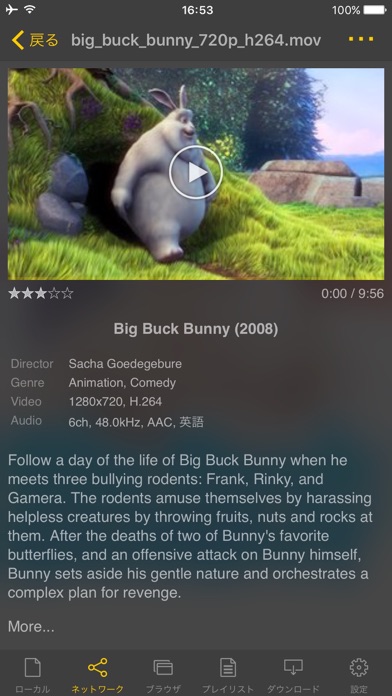
Screenshots



Information
| Genre | Entertainment |
| Vendor | Newin Inc. |
| App Version | 3.14.1 |
| Min iOS Version | 15.0 |
| File Size | 64.2 MB |
| Platform | iPhone/iPad |
User Reviews
 Help others and write a review now!
Share this offer
Copy to clipboard


