


Scanner Pro - PDF document scanner with OCR
2009


Scanner Pro - PDF document scanner with OCR

Free
18,99zł

 Add to Wishlist
 Add to "My Purchases"
More
Add to Block ListCopy iTunes Link to Clipboard
Scanner Pro - PDF document scanner with OCR
2009For Scanner Pro - PDF document scanner with OCR, the current price at App Store is . The lowest price ever was , available on 11.12.2020. You are paying more than the best deal.
Price Information
Lowest
Current
-18,99zł
18,99zł
Highest
All Time
All Time 
Price Trend of Scanner Pro - PDF document scanner with OCR on App Store

29.08.17
18,99zł
11.12.20
Free

Initial price - The price at which the title entered the store.
Price drop - The price compared to the one before has dropped.
Price raise - The price compared to the one before has raised.
Best price - The lowest price the title has ever had to date. If the price comes back to this value later, however, only a price drop (green) is displayed.
Summary
Readdle, the company behind Scanner Pro, turns 10! Learn more about our 10-year story at readdle.com
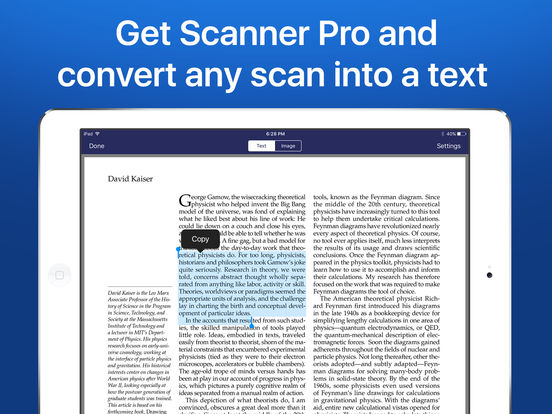
Scanner Pro is the best app for quickly scanning and saving a digital version of a paper document.... Scan any papers, ranging from a receipt to multi-page documents. Scanner Pro will automatically detect borders, correcting distortion and geometry. Share, email and upload your perfect scans. Use OCR to convert any scan into a text.
“I will confess to some serious love for Scanner Pro ” - Rick Broida, CNET
“Scanner Pro is an excellent app for those who'd like to digitize and organize their paper worlds.” - Marc Saltzman, USA Today
“There really isn’t a better scanner app for iPhone than Scanner Pro” - Matthew Panzarino, TNW
+ Fast and Easy Scanning +
Paper documents, receipts, checks, agreements, rentals, dashboards. Scanner Pro does a great job scanning all sorts of papers and digitizing them. You can even scan agreements and books into multi-page PDFs or JPEGs.
+ Advanced Image Processing +
Create great-looking documents with original pictures, color stamps and signatures. Scanner Pro will automatically detect borders in real time, correcting distortion and geometry. You can also adjust the crop area manually, by tapping on the screen.
+ Text Recognition (OCR) +
Convert any scan into a text that can be selected and copied. Scanner Pro supports 21 recognition languages: English, German, Italian, French, Spanish, Russian, Portuguese, Dutch, Turkish, Polish, Swedish, Norwegian, Japanese, Simplified Chinese, Traditional Chinese, Czech, Danish, Greek, Croatian, Estonian and Ukrainian.
+ Workflows +
Workflows allow you to perform multiple sharing actions easily. Send an email with a defined recipient, upload to Dropbox and save document to the required folder. Now you can perform all these actions in just one tap.
+ Search your Photo Library for documents +
“Scan Radar” automatically finds photos of documents and receipts in your Photo Library. Now you can use your favourite camera app to scan something and quickly find it afterwards in Scanner Pro.
+ Share your scans +
Just scan any document and tap the "Share" button. You can send scanned documents via email, export to Photos or open in any 3rd party application. With Scanner Pro you can also print your documents or even fax them.
+ Upload scans to online storage +
All your scans can be uploaded to Dropbox, Evernote, Google Drive, Box, iCloud Drive, OneDrive, OneNote or any other WebDAV-enabled online storage.
+ iCloud sync across all devices +
Access to all your scanned documents on your iPhone, iPad and Mac. Scan a document on your iPhone or iPad and it will be uploaded to iCloud Drive automatically. Sync between all of your devices, and even view them on your Mac.
+ Protect your PDFs+
Add a password to make sure only those you want to can open your document.
+ Edit. Save. Edit again. +
Every change you make to your scans is kept track of as you make it. That means you can always go back and change or reverse an edit if you need to.
IMPORTANT NOTE FROM THE DEVELOPERS:
If you have any questions, feedback or suggestions, please contact us directly at rdsupport@readdle.com or http://readdle.com/contact
Screenshots


Information
| Genre | Business |
| Vendor | Readdle Technologies Limited |
| App Version | 9.0.6 |
| Min iOS Version | 18.0 |
| File Size | 246.7 MB |
| Platform | iPhone/iPad |
User Reviews
 Help others and write a review now!
Share this offer
Copy to clipboard


