






BeatCut - Sampler for Video
2026

BeatCut - Sampler for Video

2,99 €
5,99 €

 Add to Wishlist
 Add to "My Purchases"
More
Add to Block ListCopy iTunes Link to Clipboard
BeatCut - Sampler for Video
2026Für BeatCut - Sampler for Video liegt der aktuelle Preis bei App Store bei 2,99 €. Der niedrigste Preis aller Zeiten betrug 1,99 €, verfügbar am 27.01.2026. Du zahlst 1,00 € mehr als beim besten Angebot.
Price Information
1,99 €
Lowest
+1,00 €
2,99 €
Current
-3,00 €
5,99 €
Highest
Alle Zeiträume
Alle Zeiträume 
Price Trend of BeatCut - Sampler for Video on App Store

01/27/26
1,99 €
02/02/26
5,99 €
07/14/26
3,99 €
07/20/26
5,99 €
10/25/26
2,99 €
10/26/26
5,99 €
11/01/26
3,99 €
11/02/26
5,99 €
11/27/26
2,99 €

Initial price - The price at which the title entered the store.
Price drop - The price compared to the one before has dropped.
Price raise - The price compared to the one before has raised.
Best price - The lowest price the title has ever had to date. If the price comes back to this value later, however, only a price drop (green) is displayed.
Summary
BeatCut — Play Video Like an Instrument
BeatCut is a tap-to-remix video performance app.
- Chop videos into playable pads
- Perform visuals in real time
- Record your jam as a finished video — syn...ced to your music.
- AUv3 audio plugin extension.
Inspired by sampler instruments, BeatCut turns video into something you play, not edit.
Play Mode: Perform Live
- Tap pads to instantly trigger video chops
- Loop, hold, reverse, or ping-pong playback
- Smooth per-pad transitions
- Perform fullscreen with pads overlaid on the video
- Designed for one-handed, thumb-friendly performance
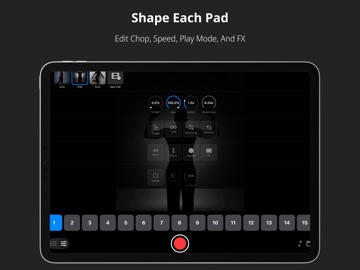
Edit Mode: Shape Your Chops
- Assign clips to pads
- Define chop start and end points
- Adjust playback speed and duration
- Choose per-pad play modes:
- Trigger or Hold
- Loop
- Ping-Pong
- Reverse
- Apply visual FX per pad:
- Flip horizontal / vertical
- Color styles (B&W, Negative, Posterize, Sepia)
- Scale modes (Fit, Fill, Stretch)
- Transition styles:
- Fade In
- Slide In (from left, right, top, or bottom)
Import & Trim Video Clips
- Pick videos directly from your device
- Trim clips with a dedicated trimmer (up to 60 seconds per clip)
- Import multiple clips into a single project
- First clip is auto-chopped across all pads for instant playability
- Drag and drop support
Add a Backing Audio Track
- Import a music track from Files
- Trim and preview audio before performing
- Audio plays independently from video playback
- Perfect for syncing visual performance to music
- Drag and drop support
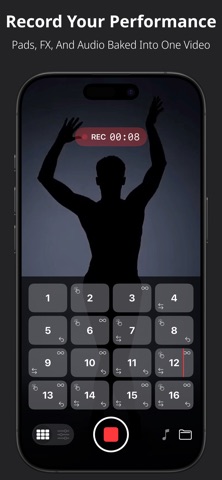
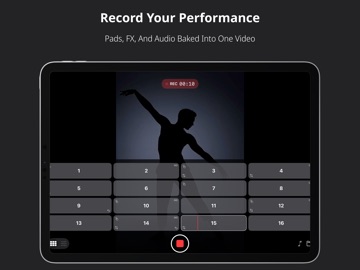
Record Your Performance
- Record exactly what you perform — pads, FX, speed changes, and loops
- Backing audio is mixed into the final video
- Exported video is saved directly to Photos
- Share instantly
Project Management
- Save, duplicate, and organize projects
- Projects are stored locally as lightweight files
- Media is managed automatically per project
Built for Performance
- No timelines
- No layers
- No keyframes
Ideal for:
- Visual performers & VJs
- Musicians & producers
- Content creators & remix artists
- Anyone who wants to turn video into a playable instrument
BeatCut — tap, remix, and perform video in real time.
Screenshots





Information
| Genre | Photo & Video |
| Vendor | Cem Olcay |
| App Version | 2.0 |
| Min iOS Version | 15.6 |
| File Size | 12.0 MB |
| Platform | iPhone/iPad |
User Reviews
 Help others and write a review now!
Share this offer
Copy to clipboard


