





Camera M - Pro Manual Camera
2017


Camera M - Pro Manual Camera

$8.99
$7.99

 Add to Wishlist
 Add to "My Purchases"
More
Add to Block ListCopy iTunes Link to Clipboard
Camera M - Pro Manual Camera
2017For Camera M - Pro Manual Camera, the current price at App Store is $8.99. The lowest price ever was $2.99. You are now paying $6.00 more than the best deal.
Price Information
$2.99
Lowest
+$6.00
$8.99
Current
$8.99
Highest
All Time
All Time 
Price Trend of Camera M - Pro Manual Camera on App Store

10/09/17
$2.99
04/30/18
$3.99
08/01/18
$2.99
11/18/18
$3.99
12/15/20
$4.99
04/13/21
$3.99
10/25/21
$6.99
11/24/21
$7.99
10/20/26
$8.99

Initial price - The price at which the title entered the store.
Price drop - The price compared to the one before has dropped.
Price raise - The price compared to the one before has raised.
Best price - The lowest price the title has ever had to date. If the price comes back to this value later, however, only a price drop (green) is displayed.
Summary
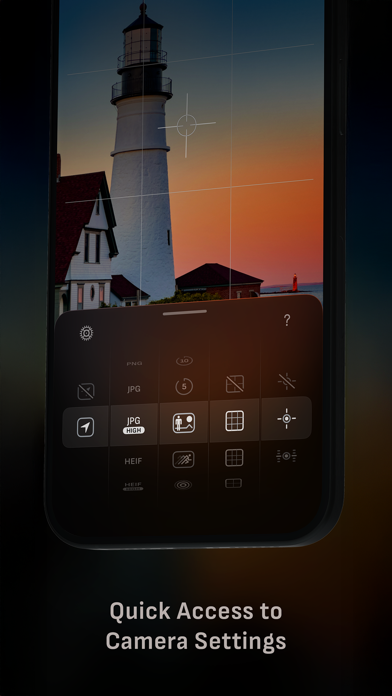
Camera M is a professional manual camera app designed to do one thing exceptionally well — help you capture beautiful photos at the highest possible quality with powerful, precise manual controls akin... to a DSLR.
HIGHLIGHTS
• Fluid gesture-based native manual controls with Fine-Tuning feature
• iOS 27 optimization with Liquid Glass design
• Optimized for iPhone 18 Pro, with aperture control
• Zero-process RAW support for the most natural look
• Max Image Processing to ensure the absolute best image quality
• ProRAW*, RAW, HEIF, JPEG, TIFF, and PNG image formats
• Single, Burst, Timer, Live, Depth*, Dual Photo*, and Bracket shooting modes
• Triple Photo mode with simultaneous ultra-wide, wide-angle, and telephoto camera capture*
• Minimum focus distance display for macro photography
• Intelligent Focus Tracking
• Focus Peaking and 4x magnifier loupe with panning function
• Live RGB and RGB luminance histograms
• Manual gray card calibration
• Great widgets for photography
• Darkroom integration
CAMERA CONTROLS
– Manual focus
– Macro and Scene focus presets
– Exposure bias
– Manual ISO & exposure duration adjustments
– ISO & exposure duration semi-priority modes
– Manual white balance temperature and tint
– White balance presets
– Gray card white balance calibration
– Auto, on, and off flash modes
– Manual torch brightness level
– Manual switching between Ultra Wide, Wide, and Telephoto cameras*
– Digital pinch zoom with 10x range
– Camera Control support for all manual controls
– Lock Screen camera capture support
IMAGE FORMATS
– Apple ProRAW*
– RAW with stabilization
– HEIF with optional minimum compression
– JPEG with optional minimum compression
– TIFF
– PNG
– Live Photo
– P3 wide color support*
SHOOTING MODES
– Single
– Burst
– Timer
– Depth*
– Dual/Triple Photo*
– Live Photo*
– Bracket
TOOLS
– Exposure offset gauge
– Intelligent Focus Tracking
– Live focus peaking assistant
– 4x magnifier loupe with panning function
– Minimum focus distance display
– Live RGB and RGB luminance histograms
– Highlight & shadow alert display
– Horizon level with available pitch tracking and flat options
– Rule of Thirds, Golden Ratio, Quadrant, and Square grids
– Siri Shortcuts and App Shortcuts
– Detailed camera specifications display with PDF export
MAX IMAGE PROCESSING
– Deep Fusion and Smart HDR support for iPhone 11 and later.
– Ensures maximum image quality with better noise reduction, image stabilization, and additional processing for all other iPhones and iPads
ZERO-PROCESS RAW
– Capture standard RAW files with no extra processing
PHOTO LIBRARY
– Summarized and full EXIF metadata display
– Location data display with compass and elevation
– RGB and RGB luminance histogram displays
– Access to all photo albums and folders
WIDGETS
– Home Screen: Golden Hour, EXIF, and Cameras
– Lock Screen: Cameras and Golden Hour
– Control Center: Focus, exposure, and white balance
APPLE WATCH SUPPORT
– Shutter button control
– Sunrise, sunset, and Golden Hour display with sun position indicator
ERGONOMICS
– True one-handed control on all iPhones
– An uncompromising approach to user experience in landscape orientation
ACCESSIBILITY
– Dynamic Type support
– Bold Text support
– Increase Contrast support
TECHNOLOGY
Camera M is powered exclusively by native APIs and frameworks. There are absolutely no dependencies on any outside sources. This makes it responsive and efficient — from its small download size to its quick app launch times.
We hope you enjoy taking amazing photos with Camera M!
Website: www.camera-m.com
User manual: www.camera-m.com/manual
Get in touch: contact@camera-m.com
Follow us: @CameraMApp
#CameraM
* These features are available on supported devices only.
* Depth capture for selfies requires an iPhone or an iPad with a TrueDepth camera system.
* Apple ProRAW capture requires iPhone 12 Pro or later.
* For more information on device and feature compatibility: www.camera-m.com/compatibility
Screenshots




Information
| Genre | Photo & Video |
| Vendor | bxb, LLC |
| App Version | 10.0 |
| Min iOS Version | 16 |
| File Size | 33.2 MB |
| Platform | iPhone/iPad |
User Reviews
 Help others and write a review now!
Share this offer
Copy to clipboard


