


Mino - PDF Scanner & Converter
2026

Mino - PDF Scanner & Converter

Free
$2.99

 Add to Wishlist
 Add to "My Purchases"
More
Add to Block ListCopy iTunes Link to Clipboard
Mino - PDF Scanner & Converter
2026For Mino - PDF Scanner & Converter, the current price at App Store is . The lowest price ever was , available on 11/23/2026. You are paying more than the best deal.
Price Information
Lowest
Current
-$2.99
$2.99
Highest
All Time
All Time 
Price Trend of Mino - PDF Scanner & Converter on App Store

02/09/26
$2.99
11/23/26
Free

Initial price - The price at which the title entered the store.
Price drop - The price compared to the one before has dropped.
Price raise - The price compared to the one before has raised.
Best price - The lowest price the title has ever had to date. If the price comes back to this value later, however, only a price drop (green) is displayed.
Summary
Every PDF tool you need, in one app that works offline. Scan paper, fill in and sign forms, convert photos and Office files, and make big PDFs small enough to send. Your files never leave your device....
SCAN TO PDF
Point the camera at a page: Mino finds the edges, straightens it and cleans it up. Scan several pages into one PDF, in color, grayscale or black and white.
FILL & SIGN
Tap a form field to fill it in, tick boxes, choose from lists. Draw your signature once and place it, with your initials and today's date, anywhere on the page. Mino keeps your signature on this device only. (A drawn signature, not a certified digital signature.)
EDIT & ANNOTATE
Highlight text, draw with your finger or Apple Pencil, add notes, shapes, arrows and pictures, and cover parts of a page with white-out.
CONVERT
- Photos to PDF: JPG, PNG and HEIC into one PDF, in the order you choose
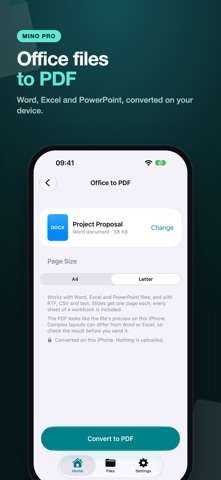
- Office to PDF: Word, Excel and PowerPoint files, plus RTF, text, CSV and HTML
- PDF to Images: every page as JPG or PNG, saved to Photos
- PDF to Text: the words of a PDF in reading order, best for text documents
RECOGNIZE TEXT
Make scanned PDFs searchable, or copy their text. Recognition runs on your device.
COMPRESS
See the size of each setting before you start, then shrink PDFs for email, messages and uploads. Batch-compress many files at once with Mino Pro.
ORGANIZE, MERGE, SPLIT
Rotate, delete, duplicate and reorder pages, insert pages from another PDF, combine several PDFs into one, or take out just the pages you need.
PROTECT & UNLOCK
Add a password to a PDF, or remove one you know.
MADE FOR IPHONE, IPAD AND IPHONE DUO
Native, in light and dark mode. On iPad and the unfolded iPhone Duo your tools and your files sit side by side. Open PDFs from Files, Mail or any app with the Share Extension, or drag them in.
PRIVATE BY DESIGN
Mino processes everything on your device. No uploads, no account, no tracking.
TRY EVERYTHING, PAY ONCE
Scan, compress, convert photos, export images and organize pages 3 times a day for free. Every other tool opens for you to set up and try. Mino Pro unlocks all tools without limits with a single purchase: no subscription, and Family Sharing is included.
Questions or ideas? We'd love to hear from you.
Screenshots




Information
| Genre | Utilities |
| Vendor | Navid Gooranourimi |
| App Version | 2.0 |
| Min iOS Version | 18.6 |
| File Size | 45.7 MB |
| Platform | iPhone/iPad |
User Reviews
 Help others and write a review now!
Share this offer
Copy to clipboard


