


LapseCraft
2026
LapseCraft
$0.99

 Add to Wishlist
 Add to "My Purchases"
More
Add to Block ListCopy iTunes Link to Clipboard
LapseCraft
2026For LapseCraft, the current price at App Store is $0.99. There hasn't been any price reductions so far.
Price Information
$0.99
Lowest
$0.99
Current
$0.99
Highest
Price Trend of LapseCraft on App Store

11/27/26
$0.99

Initial price - The price at which the title entered the store.
Price drop - The price compared to the one before has dropped.
Price raise - The price compared to the one before has raised.
Best price - The lowest price the title has ever had to date. If the price comes back to this value later, however, only a price drop (green) is displayed.
Summary
LapseCraft turns your iPhone or iPad into a timelapse camera, with a full editor built in. Set it up, walk away, and come back to a sunset, a night sky or a busy street squeezed into a few seconds of ...video. Then polish it and export it, all without leaving the app.
SHOOT FOR AS LONG AS YOU LIKE
• Pick any interval from half a second to 24 hours.
• Smart exposure follows the light as day turns into night, so your sunsets glide instead of jumping in steps.
• Prefer to be in control? Manual mode lets you set ISO and shutter, and change them while you record.
• Keep every frame as a photo too: HEIC or JPG, up to 48 MP, with HDR.
• Tap the 1x or Tele lens a second time to zoom in 2x at full detail (iPhones with a 48 MP camera).
• Long Exposure stacks frames together for exposures longer than the camera can take on its own.
• Focus peaking, a focus score and a live histogram help you get the shot right before you start.
• See at a glance how long your battery and storage will last.
• If something interrupts a shoot, the frames you already have can be rescued into a project.
MAKE IT LOOK GREAT
• Edits gives you exposure, contrast, highlights, shadows, white balance, colour by hue, sharpening, noise reduction, vignette, grain, crop and straighten, applied to every frame at once.
• Deflicker smooths out the brightness jumps timelapses are known for, and shows you the curve so you can fine-tune it.
• Star Trails turns a night sky into sweeping trails, and takes out the planes and satellites passing through.
• Smooth Motion blends frames for a soft, slow-shutter look.
• Time-Slice turns a shoot into one picture made of strips from across the day, or a video where time sweeps across the screen.
• Pull out bad frames from a contact sheet.
• Change or remove any step later. Your original shoot is never touched.
SPEED IT UP, SLOW IT DOWN, SHARE IT
• Create a speed ramp as a curve to speed up, slow down or linger on a moment.
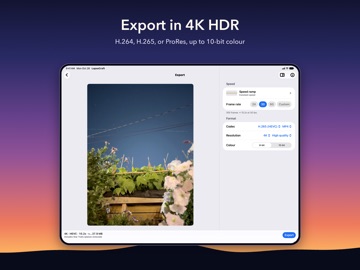
• Export H.265, H.264 or ProRes, from 720p up to 6K (ProRes up to 4K), in 8-bit, 10-bit or HDR.
• Add a slow zoom to any export for a gentle push-in.
• Export several projects in one go.
• Save to Photos, share it, or export the whole project as a zip.
• Save edited copies of every photo if you'd like to finish the sequence in another app.
• On iOS 26 or later, exports and edits keep going when you switch apps, with a Live Activity to show the progress and a Cancel button.
GREAT ON IPAD TOO
• Everything works on iPad: shoot, edit and export.
• Turn it on its side and the Library shows your shoots beside a big preview of the one you pick.
• The editors give your picture most of the screen, with the controls under it or beside it, on whichever side you like.
• Put the camera controls on the left, in the middle or on the right.
APPLE WATCH REMOTE
• Start and stop a shoot from your wrist.
• See what the camera sees, right on your watch, to frame the shot.
• Check the running time, the frame count, and how long the battery and storage will last.
BRING YOUR OWN PHOTOS
• Turn photos you already have into a timelapse, including RAW files from another camera.
• Move a project from one iPhone or iPad to another, edits and all.
YOUR PHOTOS STAY YOURS
• No account, no ads, no analytics. LapseCraft never connects to the internet.
ProRes, 48 MP, the 2x zoom and HDR appear on the iPhones and iPads that support them.
Screenshots


Information
| Genre | Photo & Video |
| Vendor | CHRISTOPHER CALVERT |
| App Version | 1.1 |
| Min iOS Version | 18.0 |
| File Size | 14.3 MB |
| Platform | iPhone/iPad |
User Reviews
 Help others and write a review now!
Share this offer
Copy to clipboard


