


Pixelmator Classic iOS
2014


Pixelmator Classic iOS

$9.99
$4.99

 Add to Wishlist
 Add to "My Purchases"
More
Add to Block ListCopy iTunes Link to Clipboard
Pixelmator Classic iOS
2014For Pixelmator Classic iOS, the current price at App Store is $9.99. The lowest price ever was $0.99. You are now paying $9.00 more than the best deal.
Price Information
$0.99
Lowest
+$9.00
$9.99
Current
$9.99
Highest
All Time
All Time 
Price Trend of Pixelmator Classic iOS on App Store

04/30/15
$9.99
05/06/15
$4.99
07/15/15
$0.99
07/31/15
$4.99
11/25/15
$1.99
12/03/15
$4.99
11/23/16
$1.99
12/04/16
$4.99
01/24/17
$0.99
02/07/17
$4.99
11/21/17
$0.99
11/21/17
$4.99
11/22/17
$0.99
11/22/17
$1.99
12/07/17
$4.99
09/07/18
$1.99
10/21/18
$4.99
10/25/22
$9.99

Initial price - The price at which the title entered the store.
Price drop - The price compared to the one before has dropped.
Price raise - The price compared to the one before has raised.
Best price - The lowest price the title has ever had to date. If the price comes back to this value later, however, only a price drop (green) is displayed.
Summary
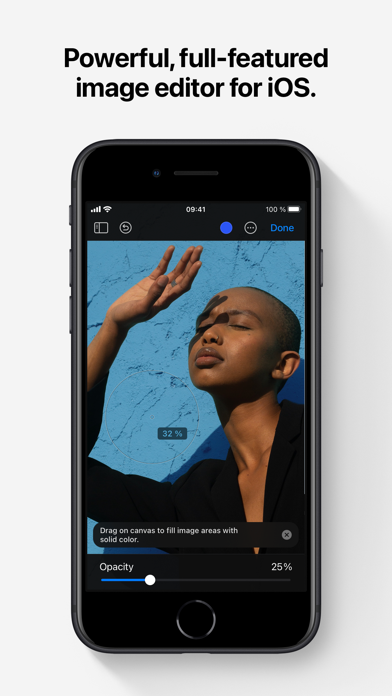
Pixelmator is a powerful, full-featured, layer-based image editor that lets you add shapes, images, and text to create beautiful image compositions, touch up and enhance images, sketch, and paint on i...Pad and iPhone alike.
Designed exclusively for iOS and iPadOS, Pixelmator takes full advantage of the latest iOS and iPadOS 17 features and technologies, giving you innovative, fast, and powerful tools.
Create Eye-Catching Designs
- Combine words, shapes, and images to create breathtaking artwork right on your iPhone and iPad
- Apply non-destructive layer styles like shadows, outlines, gradient fills, and more
- Insert, group, and blend layers of an image
- Easily add, combine, and customize shapes
- Blend layers, shapes, and text using any of the blending modes
- Use precise selection tools to edit areas of an image
- Automatically select subjects in images with the machine learning-powered Select Subject
- Crop, arrange, and rotate objects and layers with pixel-perfect precision
- Easily remove the background of images or cut and paste objects from one image to another
Add Shapes and Text
- Create flyers, logos, and other compositions using vector shapes and their styling options
- Customize Smart Shapes with easy-to-use controls
- Add text and make it look gorgeous with 24 pre-designed text styles
- Change the font, size, alignment, line spacing, use custom fonts, and more
Paint and Sketch
- Paint stunning images right on your iPhone and iPad
- Choose from over artist-designed brushes and numerous painting techniques
- Paint with near-natural wetness effect of watercolor and crayon brushes
- Create stunning pixel art images with the custom-designed Pixel brush
- Paint with incredible detail thanks to the double texture brush technology
- Vary the speed of your stroke to change the thickness of some of the brushes
- Easily select and fine-tune colors with a full-featured color picker
- Instantly choose colors right from your image with the Eyedropper
- Paint more naturally than ever with the Apple Pencil, featuring palm rejection, pressure, tilt, and acceleration sensitivity
Edit and Enhance Photos
- Get started with dozens of beautifully designed templates
- Instantly improve your photos with single-tap color presets
- Take full control over the tonal range of your image with levels and curves
- Easily remove color casts and set the right white balance
- Wipe away image imperfections, skin blemishes, and unwanted objects with the Repair tool
- Duplicate areas of your image with the easy-to-use Clone tool
- Pinch, bump, twirl, or warp areas of an image with powerful, Metal-based Distort tools
- Blur, sharpen, lighten, or darken areas of an image
- Choose from dozens of breathtaking effects to subtly improve or completely change the look of an image
- Open and edit images of up to 256 megapixels
Export and Share Images
- Optimize images for the web using quality, color depth, and size settings
- Export images to Files, iCloud, or open in other apps using a file format of your choice
- Using the integrated share extension, easily share your artwork with friends and family using Mail, AirDrop, or post it to social platforms like Instagram, Twitter, or Facebook
Compatibility
- Open and save images using HEIF, JPEG, PNG, and TIFF formats
- Work with multilayered Pixelmator Pro and Adobe Photoshop documents
- Save your edited images directly to Photos
- Create, edit, and keep all your images up to date on all your devices thanks to iCloud support
- External keyboard support with over 70 keyboard shortcuts
Built for iPhone and iPad
- Pixelmator is meticulously thought through and created from the ground up for iPhone and iPad devices
- Designed to take full advantage of powerful iOS and iPadOS features and technologies — iCloud Drive, Photos extension, Split View, and more
- Thanks to Apple silicon, Metal, Core Image, and Core Animation, Pixelmator delivers state-of-the-art performance and real-time responsiveness
Screenshots


Information
| Genre | Photo & Video |
| Vendor | Apple Inc. |
| App Version | 3.1.18 |
| Min iOS Version | 15.0 |
| File Size | 428.6 MB |
| Platform | iPhone/iPad |
User Reviews
 Help others and write a review now!
Share this offer
Copy to clipboard


