


Sidecar MIDI Controller
2016


Sidecar MIDI Controller

Free
$4.99

 Add to Wishlist
 Add to "My Purchases"
More
Add to Block ListCopy iTunes Link to Clipboard
Sidecar MIDI Controller
2016For Sidecar MIDI Controller, the current price at App Store is . The lowest price ever was , available on 11/11/2026. You are paying more than the best deal.
Price Information
Lowest
Current
-$4.99
$4.99
Highest
All Time
All Time 
Price Trend of Sidecar MIDI Controller on App Store

12/03/22
$4.99
11/11/26
Free

Initial price - The price at which the title entered the store.
Price drop - The price compared to the one before has dropped.
Price raise - The price compared to the one before has raised.
Best price - The lowest price the title has ever had to date. If the price comes back to this value later, however, only a price drop (green) is displayed.
Summary
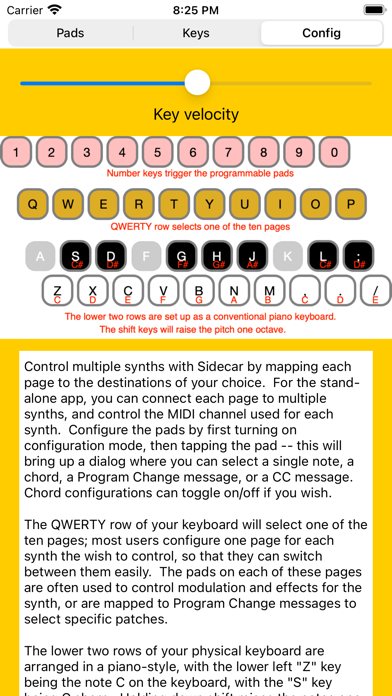
There are hundreds of great iOS synth apps, but playing them with on-screen keyboards can be a challenge. Sidecar turns your ordinary QWERTY keyboard into a powerful MIDI controller. The lower part ...of the keyboard is mapped piano-style, letting you play melodies with the physical keys -- much easier to keep your fingers in the right place, and to get the notes you want. The app is configurable; you can have ten different set-ups, and switch between them quickly with a tap on the "QWERTY" row. There are also ten configureable pads for each set-up, which you can trigger with the number keys. Each pad can play a specific note, a chord, generate a program change message, or send a control code. Because Sidecar operates in slide-over and side-by-side mode on the iPad, you can use your physical keyboard with any MIDI app, even if the other app is running in the background.
On screen, you have access to each of the pads -- map the knobs and sliders of your synth apps to MIDI CC messages, and then use Sidecar to adjust these sliders as you play.
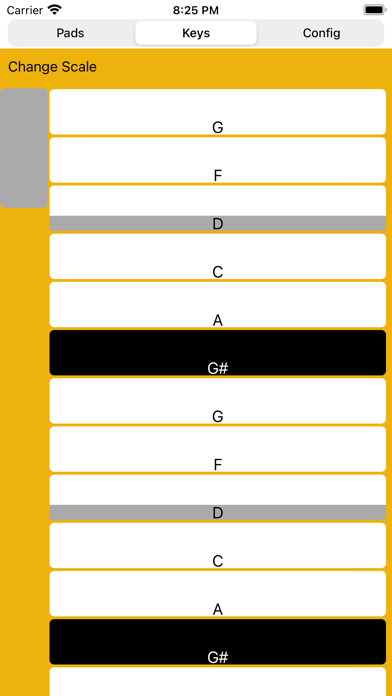
Sidecar also provides a scale-configurable virtual keyboard. Pick the scale you want, and then you can't hit a wrong note.
In addition to external keyboards, Sidecar also supports many game controllers. The app is now universal; while the iPhone doesn't support slide-over, you can still take advantage of the configuration options of the app.
* Easy MIDI Configuration
With ten separately configurable MIDI destinations you can quickly set up a set of assignments for each of the MIDI apps that you use. Have a set of chords for Animoog, choose different presets for ToneStack, or assign pads to different samples for DM1. Each MIDI destination has ten configurable pads, which can be assigned to chords, single notes, a program change message, or a controller change message. For notes and chords, the touch position controls note velocity. For controller change messages, the location of a touch on screen can be used to determine the controller value.
* QWERTY Keyboard Support
Toggle on support for the external keyboard, and you can switch between the ten MIDI destinations quickly (using the keys in the QWERTY row). Toggle on or off any of the ten pads by pressing the number keys. The two lowest rows of keys are mapped as a standard piano keyboard, providing a musical play surface with an ordinary text keyboard. Note that QWERTY keyboards only send "key press" information to your iPad -- to silence a sounding note, you simply tap the space bar.
* AUv3 Support
Add the plug-in to your favorite DAW or looper, and Sidecar will give you easy access to multiple synths. Many AUv3 hosts will also let you map the keyboard keys to the transport controls.
* Game Controller Ready
Sidecar also supports the iON iCade game controller, mapping the buttons of the iCade to the pads. Because the iCade was designed for games, it sends button press and release information, which makes it easy to toggle on and off the pads.
* MIDI Relay
If you have an external MIDI controller, you can have it send MIDI events to Sidecar -- and these will be relayed to any of the ten MIDI destinations you select. Use this to quickly switch from one synth to another.
*Control Background Synths
Because Sidecar sends MIDI messages, it can be used to control background synthesizers, sequencers, and effects apps.
Sidecar is designed to work along side your other iOS music apps.
Screenshots

Information
| Genre | Music |
| Vendor | Patrick Madden |
| App Version | 1.9 |
| Min iOS Version | 15.6 |
| File Size | 6.5 MB |
| Platform | Mac |
User Reviews
 Help others and write a review now!
Share this offer
Copy to clipboard


