






PhotoBulk: watermark in batch
2012
PhotoBulk: watermark in batch

$9.99
$19.99

 Add to Wishlist
 Add to "My Purchases"
More
Add to Block ListCopy iTunes Link to Clipboard
PhotoBulk: watermark in batch
2012For PhotoBulk: watermark in batch, the current price at App Store is $9.99. The lowest price ever was $0.99, available on 09/24/2015. You are paying $9.00 more than the best deal.
Price Information
$0.99
Lowest
+$9.00
$9.99
Current
-$10.00
$19.99
Highest
All Time
All Time 
Price Trend of PhotoBulk: watermark in batch on Apple TV

08/18/15
$4.99
09/22/15
$7.99
09/24/15
$0.99
09/26/15
$1.99
09/28/15
$3.99
09/30/15
$4.99
10/23/15
$5.99
10/24/15
$6.99
11/27/15
$4.99
11/28/15
$6.99
11/30/15
$4.99
12/01/15
$5.99
02/25/16
$9.99
02/29/16
$5.99
05/30/16
$9.99
06/07/16
$1.99
06/09/16
$4.99
06/10/16
$6.99
06/14/16
$9.99
03/20/17
$6.99
03/25/17
$9.99
06/20/17
$19.99
10/05/17
$9.99

Initial price - The price at which the title entered the store.
Price drop - The price compared to the one before has dropped.
Price raise - The price compared to the one before has raised.
Best price - The lowest price the title has ever had to date. If the price comes back to this value later, however, only a price drop (green) is displayed.
Summary
* New PhotoBulk 2 is released! *
PhotoBulk 2 is a profound improvement of an easy-to-use bulk image editor that lets you add multiple text/image watermarks, resize, optimize, rename and convert hundr...eds and thousands of images in just one click.
New version has a fully rebuilt interface that became much more intuitive and interactive. The live-preview functionality allows you to actually see the modifications applied to each photo in real time. And you can drag and rotate the watermarks directly on the image.
The new app engine provides almost infinite basis for the future upgrades with more image editing capabilities, such as filters, red-eye removers, etc.
**Bulk Watermark Options**
Bulk watermark lets you easily and quickly add multiple watermarks to multiple photos, using a great variety of options. Customize your photos with tags, logos or any other personal marks. Place watermark anywhere with the precise controllers, then rotate it to that very angle you want directly in the real-time preview box!
Pick one or combine several of these amazing watermark features:
*Text Watermark. Apply watermark on hundreds of your photos choosing font, size, typeface, color and opacity.
*Image Watermark. Change size of the image by width/height, choose the opacity level and place it wherever you want on your photos.
*Script Watermark. Fill your photo with text tags. Text adjustment options are also available.
*Datestamp will stamp a date your photo was taken on wherever you choose it to. Various text options and date formats are available.
** Bulk Resize **
Resize hundreds of your photos in no time. Remember: reducing image dimensions will make the file size smaller. Use the variety of resizing options:
• By width and height. Fit your images to the spot, choose one of the dimensions and other will be resized proportionally.
• Percentage. No need to know particular dimensions, simply resize your photo by percent.
• By max size. Set the desired width and height, and all images will be resized proportionally according to the max side size.
• Free size. Use the desired dimensions by simply entering them in the box.
** JPEG & PNG Optimization **
Optimize file size of your JPEG or PNG images while keeping their original resolution, quality, and format. Use it to save your disk space or to share them faster over Internet. Please note that PNG optimization is time-consuming and works slower than JPEG optimization.
**Bulk Rename**
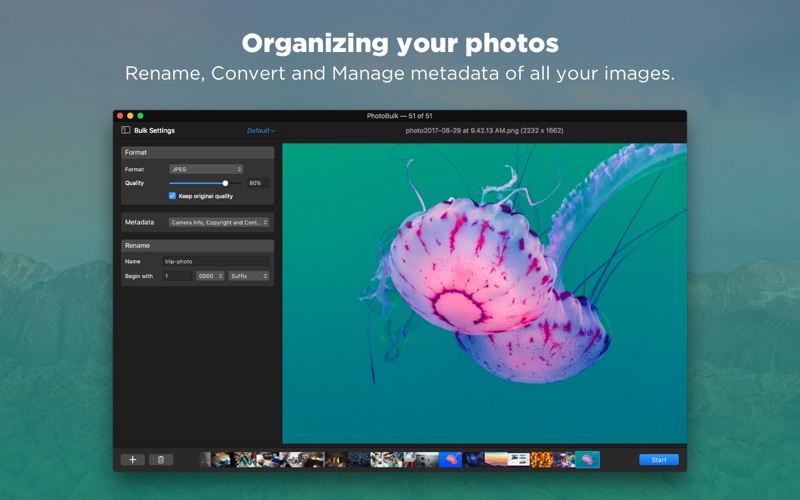
Forget about those weird camera names, rename photos by giving a new filename and number sequences. You can also vary starting digit and number of zeros.
**Bulk Conversion**
Convert hundreds of photos for your convenience and easy sharing. Save all your images in desired format without any troubles. Bulk image conversion works with the most popular formats, like JPEG, PNG, GIF, BMP, TIFF and HEIC (for 10.13).
** Easy settings **
Save your favorite and most used settings to presets for even faster bulk editing.
** Real-Time Preview **
Check how your files will look like before they are processed. Experiment with watermarks and sizes to achieve the desired results. Drag and rotate the watermarks directly in the preview box.
** Supported Formats **
JPEG, PNG, GIF, BMP, TIFF and HEIC (macOS 10.13 only)
Save your time on image processing with PhotoBulk 2 – simple app for batch/bulk resizing, optimization, and applying a watermark to photos and images.
Screenshots


Information
| Genre | Photo & Video |
| Vendor | ELTIMA LLC |
| App Version | 2.8 |
| Min iOS Version | 10.13 |
| File Size | 13.9 MB |
| Platform | Mac |
User Reviews
 Help others and write a review now!
Share this offer
Copy to clipboard


